10-in-10, Week 5: Berlin Relocation Calculator
When I moved to Berlin two and a half years ago, one of the hardest things wasn't finding an apartment or learning enough German to survive at the Buergeramt. It was understanding what my money would look like on the other side.
Germany's tax system is genuinely dense. Six tax classes. A five-zone progressive income tax formula. A solidarity surcharge. Optional church tax. Four branches of social insurance, each with different rates and contribution ceilings. And a provision allowance calculation where the government computes two variants and uses whichever is more favorable to you. I spent hours with Google Translate open in one tab and a calculator in another, trying to piece together what my take-home pay would actually be. None of the tools I found explained things simply, and it seemed the only option to really get a confident picture of my tax burden was to hire a tax advisor. That's the experience this project is meant to ease.
The Berlin Relocation Planner is a four-step wizard that walks someone through the full financial picture of moving to Berlin: salary and tax breakdown, neighborhood comparison, monthly budget planning with AI-powered analysis, and a visa and admin checklist tailored to their situation. It's the tool I wish I'd had.
This week's project started as a learning exercise. I've noticed that many of the larger tech companies here in Berlin build their products with Angular and Kotlin, and I wanted real experience in both rather than just listing them as things I've touched. But as I built, the project took on its own momentum. Having gone through the relocation process myself, and still regularly fielding questions from people who are planning to move here, I wanted it to be genuinely useful to people. Not a toy. Not a tutorial project. Something someone could actually sit down with and find helpful. A thing I'd proudly send to my friends asking me about the process.
There are other resources out there. All About Berlin is one I used extensively when planning my own move, and it's fantastic. But it's a content site, broad and deep, better suited for someone who already has a serious interest and knows what questions to ask. The idea with this app is to be more focused and less overwhelming. A quick, personalized look at whether moving here would make financial sense at all, no bloat, no set-up, tailored to your own situation from the start.
To ground the build in production patterns rather than tutorial code, I found a publicly available web app from one of these larger companies, checked its stack with Wappalyzer, saved the page and its files in my browser, and passed the files into an AI to help extract their production ethos.
Warning! Jargon ahead:
- Standalone components with zero NgModules.
- Reactive forms with Validators.
- Angular Signals as the primary state mechanism.
- OnPush change detection everywhere.
- 3-tier design token system through CSS custom properties.
- Tailwind classes wherever possible, avoiding inline styles.
- Shared API contract for the frontend and backend.
- And more than should be listed in a blog post.
I mirrored those patterns throughout the project. The goal was to write code that would look natural to an engineer working in that kind of environment, not code that reads like it came from a Getting Started guide.
What It Does
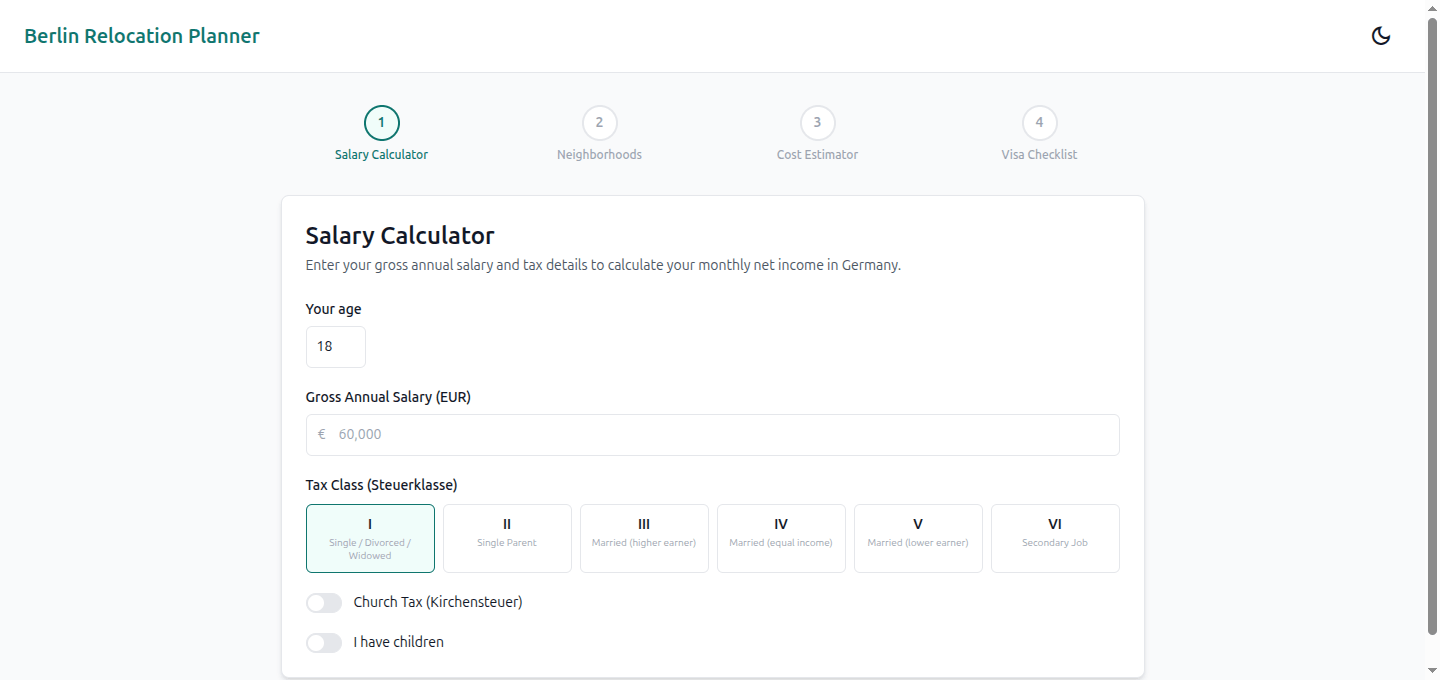
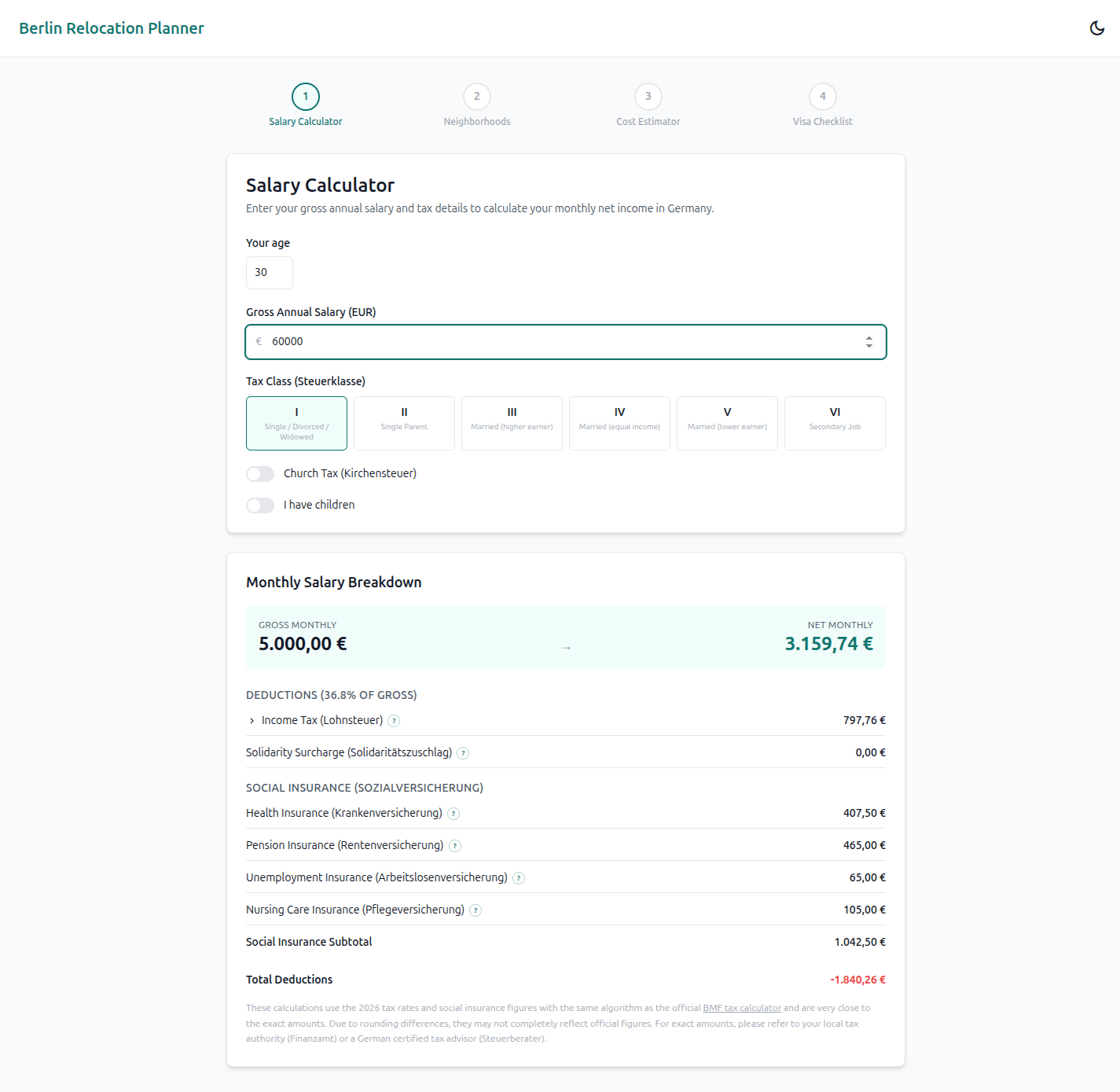
Step one is the salary calculator. Enter your age, gross annual salary, select your tax class, toggle church tax and children, and the app sends that to the backend, which runs the 2026 German Lohnsteuer algorithm and returns a complete breakdown. Every deduction line has an info bubble explaining what it is and why it's collected. You see exactly where your money goes each month.
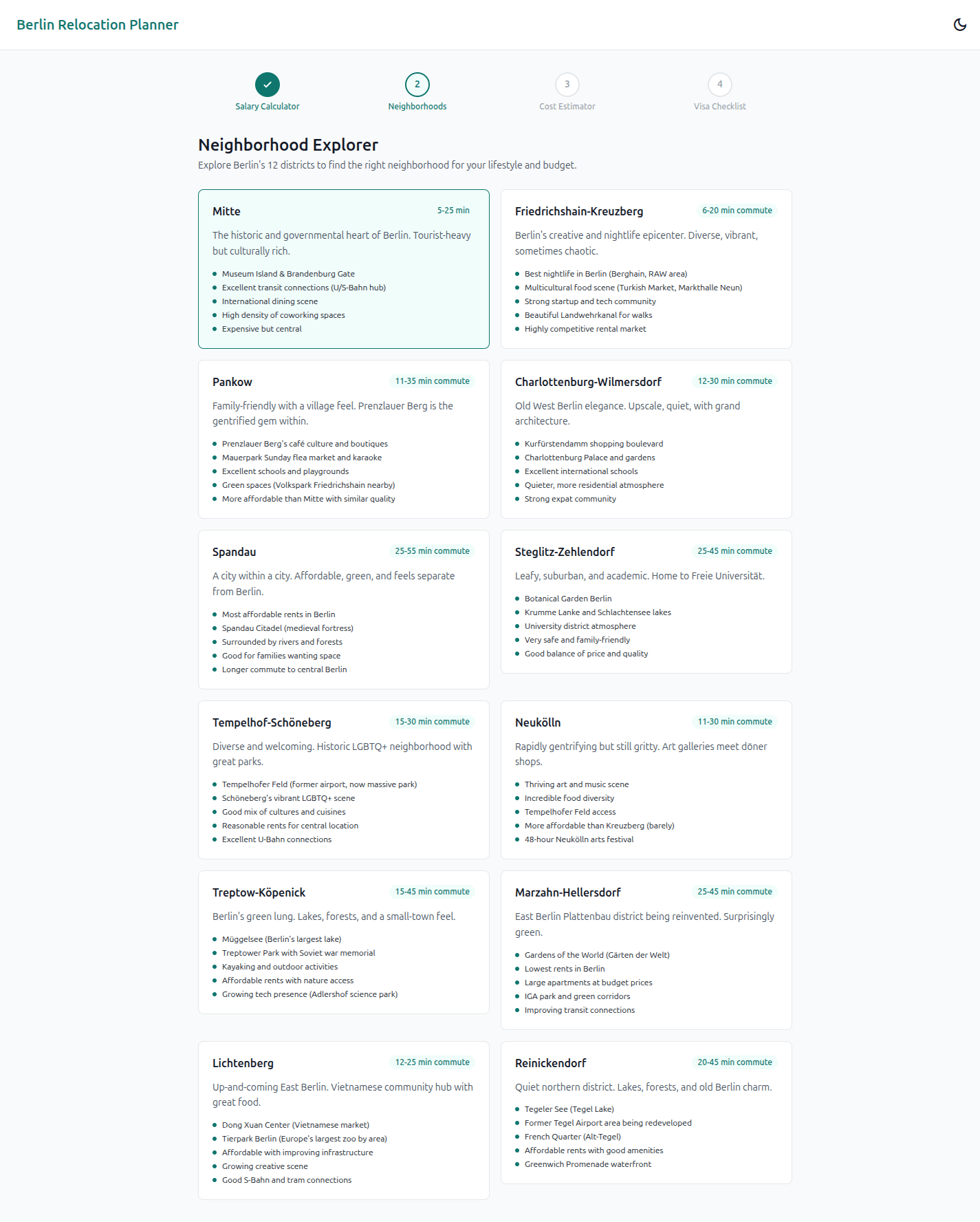
Step two is the neighborhood explorer. All twelve Berlin Bezirke (districts) displayed in a grid, each with a description of the culture, commute time range to Mitte, and key highlights. Click one to select it and carry that choice into the next step.
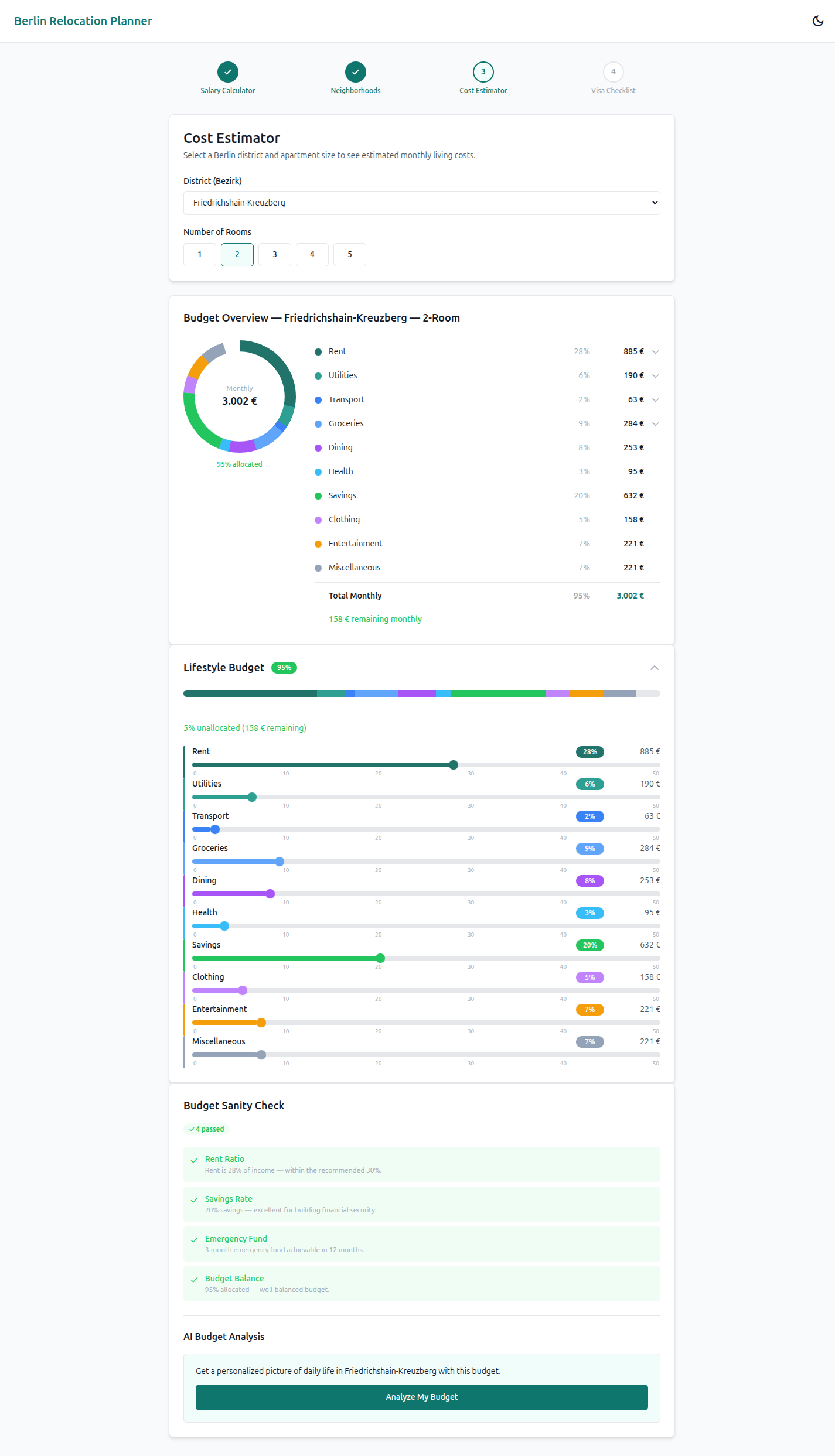
Step three is the cost estimator and budget planner. Ten interactive sliders for categories like rent, groceries, transport, dining, savings, and entertainment. An SVG donut chart (zero external dependencies, just circles with calculated stroke-dasharray values) updates in real time as you adjust. A rules engine runs five sanity checks on your budget: rent-to-income ratio, savings rate, emergency fund feasibility, total allocation, and grocery reasonableness. And when you're ready, an "Analyze My Budget" button sends your full financial context to an AI that returns a seven-section narrative about your life in Berlin on that budget.
Step four is the visa checklist. A default nineteen items across four categories (pre-arrival, first week, first month, settling in), filtered by your visa type: EU Blue Card, Freelance Visa, or Job Seeker Visa. Each item expands to show detailed, practical guidance: the Anmeldung (address registration) item tells you it's free (although some municipalities will charge a small admin fee), must happen within 14 days of moving in, and that you need a Wohnungsgeberbestätigung (permission to register your address) from your landlord. The health insurance item explains the EUR 73,800 threshold where private coverage becomes an option. The Deutschlandticket item gives you the current price and where to buy it. Every item that has a corresponding government page links directly to it.
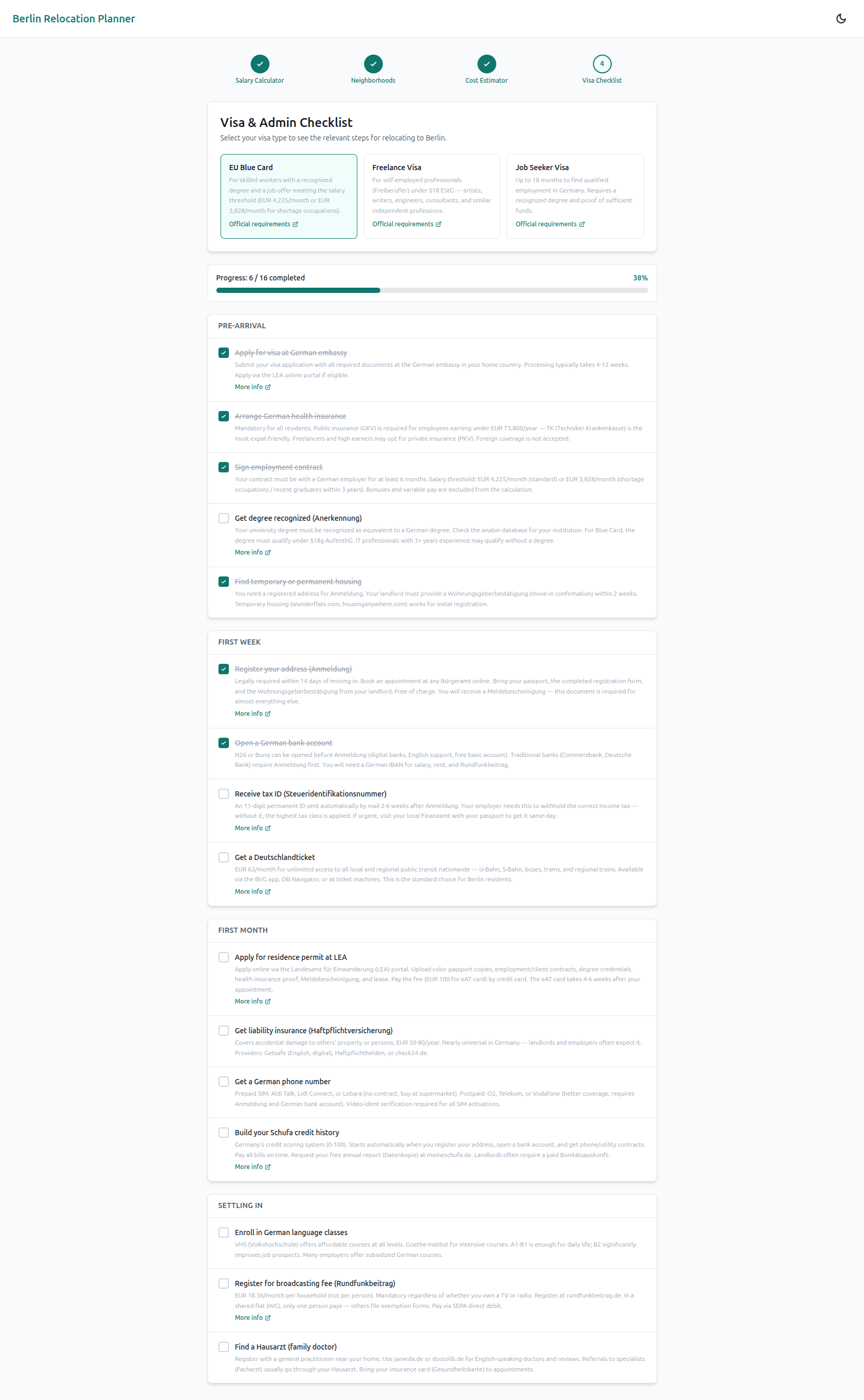
This section was the most straightforward to build, but for someone about to move here, it might be the most immediately useful. Having all of it in one place, checked off as you go, with progress persisting to localStorage so you can close the tab and come back, takes a real weight off. I remember the feeling of not knowing what I didn't know. A checklist can't solve that entirely, but it helps. As always, though, check the official sources before relying on the checklist! There is no automatic update of these items, and you never know when requirements wiill change.
All four steps share state through a central WizardService backed by Angular Signals. Your salary from step one feeds the budget percentages in step three. Your Bezirk selection from step two drives the cost estimates. Close the browser, come back tomorrow, everything is still there (as long as you don't clear your browsing data).
The Tax Algorithm
The salary calculator is the feature I spent the most time on, and the one I'm proudest of getting right. TaxCalculationService is 466 lines of Kotlin implementing the 2026 German Lohnsteuer algorithm.
Getting the algorithm correct was the baseline. Lots of sites do that. For me though, I never found a calculator that would both tell me what my tax burden is, and also seamlessly educate me on what exactly all these terms mean. What is a Vorsorgepauschale and why am I paying it? Or wait, deducting it? What does it actually mean for my tax bill to deduct? How much does it actually save me?
Five Zones, Countless Edge Cases
The income tax alone has five zones. The first EUR 12,348 is tax-free (the Grundfreibetrag). The next two zones are progressive, governed by polynomial formulas the BMF (Bundesministerium der Finanzen) publishes each year. Then a flat 42% up to EUR 277,825 (the Spitzensteuersatz), and 45% above that (the Reichensteuer). Layer on the Solidaritaetszuschlag at 5.5% above a threshold, optional Kirchensteuer at 9% in Berlin, and four branches of social insurance with their own rates and ceilings. Then account for the Vorsorgepauschale, the Werbungskosten-Pauschbetrag, Sonderausgaben, Ehegattensplitting for tax class III, and a single-parent relief for class II. It's a lot.
Getting this right was as gnarly as it sounds. At one point I had ten browser tabs open, each with a different source or implementation of the same formula. None agreed completely. None explained the logic simply enough to implement from. I eventually went to the official source: the BMF provides all the calculators you'd need, and after a bit of digging, I found that they publish an XML specification of their algorithm that goes far deeper into the implementation details than any third-party calculator. That became my reference.
To validate, I mirrored inputs against official German tax calculators and compared output by output. For a gross annual salary of EUR 60,000, my Lohnsteuer was off by EUR 0.04 per month. I can live with that. Probably, no, definitely a rounding error difference.
Why It's Personal
When I moved to Berlin, understanding the taxation system was one of the most disorienting parts of the process. So much jargon, so many interdependent calculations, all in a language I was still learning at the time. Once you understand it, it makes sense. But learning it while dealing with everything else that comes with relocating abroad was so challenging. I wanted the breakdown display to do what no calculator I found did for me: explain each line item in plain language, not just show the numbers.
Thoughts On the Stack
How Angular Thinks
Coming from React and Vue, Angular's approach was the biggest adjustment. The frameworks I typically work with follow a philosophy of "it works a certain way unless you need something different, then you declare." Angular is the opposite. Unless you declare it, nothing happens. You declare your routes. You declare your providers. You declare your inputs, outputs, and change detection strategy. You declare your form controls and their validators individually. It's more code across the board.
But as I worked this way, I began to understand part of the reason it is so favored by larger companies. It's auditable in a way that's hard to replicate in more convention-heavy frameworks. When something breaks, you can trace exactly where the declaration went wrong because everything is explicit.
Contract-First Integration
That explicitness compounds when you're keeping Angular components, Kotlin services, and an OpenAPI specification in sync. The repetition is substantial. But paired with a contract-first approach, where both sides generate their types from one shared spec, the payoff was noticeable. With a solid plan and a schema change committed first, new features felt like they almost wrote themselves (unfortunately they do not actually write themselves, but hey, that's where the learning is). The integration was less buggy than I'm used to. Or perhaps the bugs were just more readily apparent. Easier to catch early. When a field changes in the OpenAPI spec, Kotlin compilation fails if the backend doesn't handle it, and TypeScript compilation fails if the frontend doesn't account for it. Thus, type mismatches get caught at build time. Never at runtime.
Having the specs in place first meant that I wasn't figuring out logic and structure at the simultaneously. I didn't need to split mental bandwidth deciding which fields this object should have when defining it for the first time. When it came time to implement, simply import the model and intellisense reminds me of exactly what needs to be there, so I never get a "ah, I forgot to pass that boolean" moment after spending time debugging why that element isn't rendering. Fewer "it works in the frontend but the backend doesn't agree" surprises because when the data shape is enforced, the logic naturally follows.
Budget Analysis: AI with a Safety Net
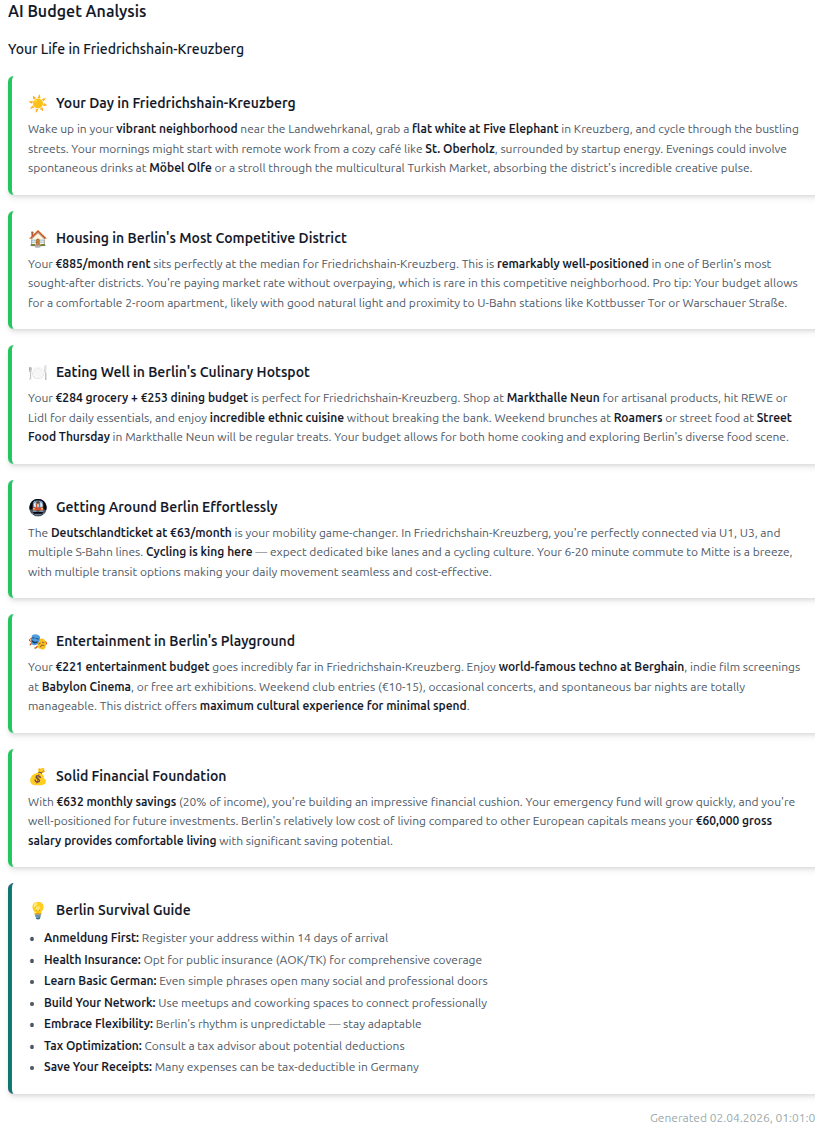
The budget analysis sends the user's full financial context (income, chosen district, all ten budget categories, rent ranges, commute times, whether they have children) to an AI model (Claude Haiku 3.5 in this case) via OpenRouter and gets back seven structured sections: a day-in-your-life picture, housing analysis, food and dining, transport, leisure and culture, financial health, and Berlin survival tips. Each section carries a sentiment (positive, neutral, or caution) that drives the visual treatment.
The Template Fallback
But the app works 100% without any AI key. BudgetService (555 lines of Kotlin) contains a complete template engine that generates all seven sections using real Berlin cost data. Bezirk-specific tips for all twelve districts. Rent positioning against actual quartile ranges. BVG pass cost comparisons (EUR 58 for AB-zone, EUR 107 for ABC). Emergency fund timeline calculations. Children-specific advice about Kindergeld and Kita waiting lists. AI is tried first. If it fails or isn't configured, the templates take over seamlessly. Users get a meaningful, Berlin-specific result either way.
Deployment
Deploying this was more of a pain than past projects. With a monorepo split across Vercel (frontend) and Railway (backend via Docker), the main challenge was making sure both platforms' build configurations correctly referenced the shared OpenAPI spec in the repo. Getting CORS right between the two environments, making production versus development API URLs switch cleanly, making sure Railway's Docker build had access to the shared/ directory from the repo root. None of it was conceptually hard, but each piece had its own configuration surface and its own way of failing quietly.
I'm thankful the debugging was limited to configuration files and not an entire hosting infrastructure. But coordinating two deployment platforms with a shared contract layer between them was a useful reminder that the "easy" modern deployment story gets more interesting the moment you're not shipping a single app.
What I'd Like to Add
The app does what I set out to build, but there's a clear list of things that would make it meaningfully better:
- Freelance toggle. The tax calculator currently handles employed income only. Adding a freelance mode would change the salary calculation, the budgeting advice, and the visa checklist filtering. It's the biggest single feature gap.
- Custom budget categories and checklist items. The ten budget categories and nineteen checklist items cover the common case, but everyone's situation is different. Letting users add their own entries would make both tools more personal.
- Real persistence. Everything currently lives in localStorage, which means your progress is locked to one browser on one machine. Some form of account or sync would let users pick up their checklist on their phone or share their budget plan with a partner.
- Export. The budget breakdown and visa checklist are both things people want to share, save outside the app, or paste into a spreadsheet. Export to PDF, markdown, or CSV would be a natural addition.
- Granular tax inputs. The current calculator is accurate but simplified. It assumes standard social contribution rates and deduction amounts. The official BMF calculator lets you override those inputs individually. Power users (or anyone with non-standard insurance) would benefit from that level of control.
- AWS deployment. This one wouldn't change much for the user, but it would level me up as an engineer. Right now, Vercel and Railway abstract away the infrastructure. As far as I can tell, Replacing them with AWS would mean setting up an S3 bucket with CloudFront for the Angular SPA, running the Spring Boot backend on ECS or Elastic Beanstalk, managing environment variables through Parameter Store or Secrets Manager, wiring up a CI/CD pipeline with CodePipeline or GitHub Actions deploying to AWS directly, and configuring the networking (ALB, security groups, route tables) that platforms like Railway handle invisibly. It's the kind of work that would deeply teach me abstractions are actually abstracting.
As I've said before, scope is an easy thing to get out of hand. The foundation is solid, and once it lives, it can grow.
What I Took Away
I'm proud of what I built this week. The tax calculator is accurate. The budget analysis gives genuinely useful, Berlin-specific advice whether the AI is running or not. The visa checklist covers the real bureaucratic gauntlet that everyone moving here has to navigate. And all of it persists across sessions so someone can come back and pick up where they left off.
More than the product, though, I value what I learned. I feel at ease in an Angular and Kotlin environment now. The nitty-gritty backend work, implementing a real government tax algorithm from an official spec, validating it to a narrow margin of error, was deeply satisfying in a way that frontend-heavy projects sometimes aren't. And the difference in design philosophy between Angular and the frameworks I typically reach for expanded my perspective on how complex software is cooperatively written and maintained at scale.
My brain is tired but satisfied. It was lots of fun getting deeply familiar with Angular, but I'm honestly happy to look away from it for a bit.... Although maybe I'm just happy to not think about taxes for a while.