Shortlist: An AI-Powered Job Search Tool, Built in a Week
If you've been job hunting recently, you know the drill. You wake up, open four tabs, scroll through the same mix of listings you've already seen, click into a few new ones, try to figure out if they're actually worth applying to, realize you need to tweak your resume for each one, and by the time you've sent two applications it's somehow been three hours. Multiply that by weeks or months and it stops being tedious and starts feeling corrosive.
I've been in that cycle myself. And after spending the last few months building tools that automate exactly this kind of grunt work for clients, I finally turned the lens inward and asked: what if I built the tool I actually wish I had?
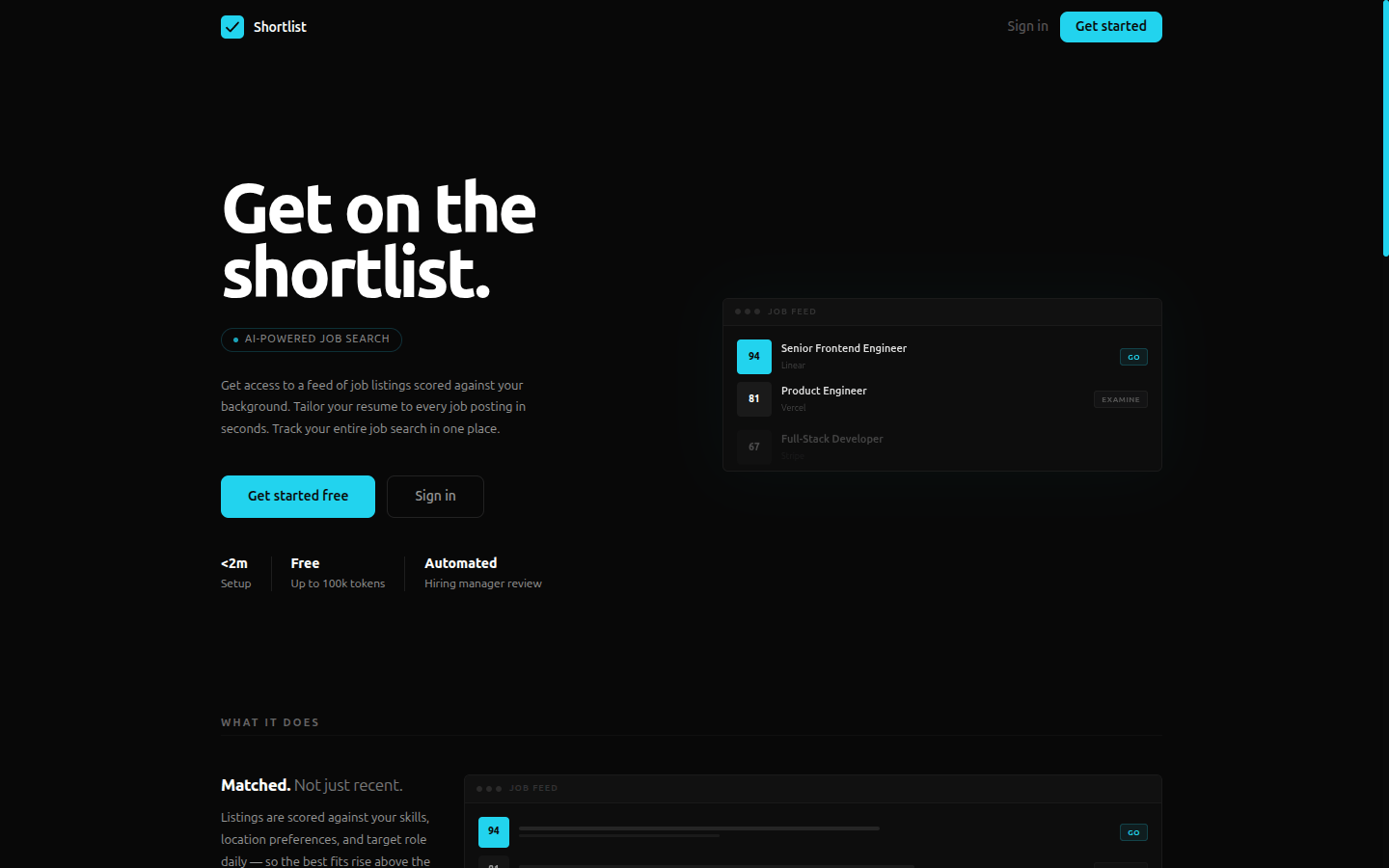
The result is Shortlist, a full-stack application that aggregates job listings from major ATS platforms, scores them against your profile using AI, tailors your resume on demand, and tracks your entire application pipeline in one place. I built it in seven days.
Where the Idea Came From
Two threads came together. The first was my real estate sourcing tool. That project taught me how satisfying it is to take a messy, manual process and compress it into something systematic. Scraping listings, classifying them with AI, surfacing only the ones worth looking at. The structure mapped almost directly onto job hunting.
The second thread was a feature I've been turning over in my head for a while: the idea of a "tailor." Not just finding good listings, but helping you respond to them with a resume that actually speaks to the specific role. Most people I talk to are going through this process manually with a chatbot interface, finagling it to give the result they need but isn't necessarily optimized to give.
When I combined those two ideas, automated sourcing plus intelligent tailoring, the shape of the product became obvious.
I also just wanted to use it. That's the most honest motivation. I'm actively looking for work in Berlin, and every hour I spend manually cross-referencing listings and reformatting my CV is an hour I'm not spending on the things that actually move the needle: building, learning, reaching out to people.
What It Does
Shortlist has five core capabilities:
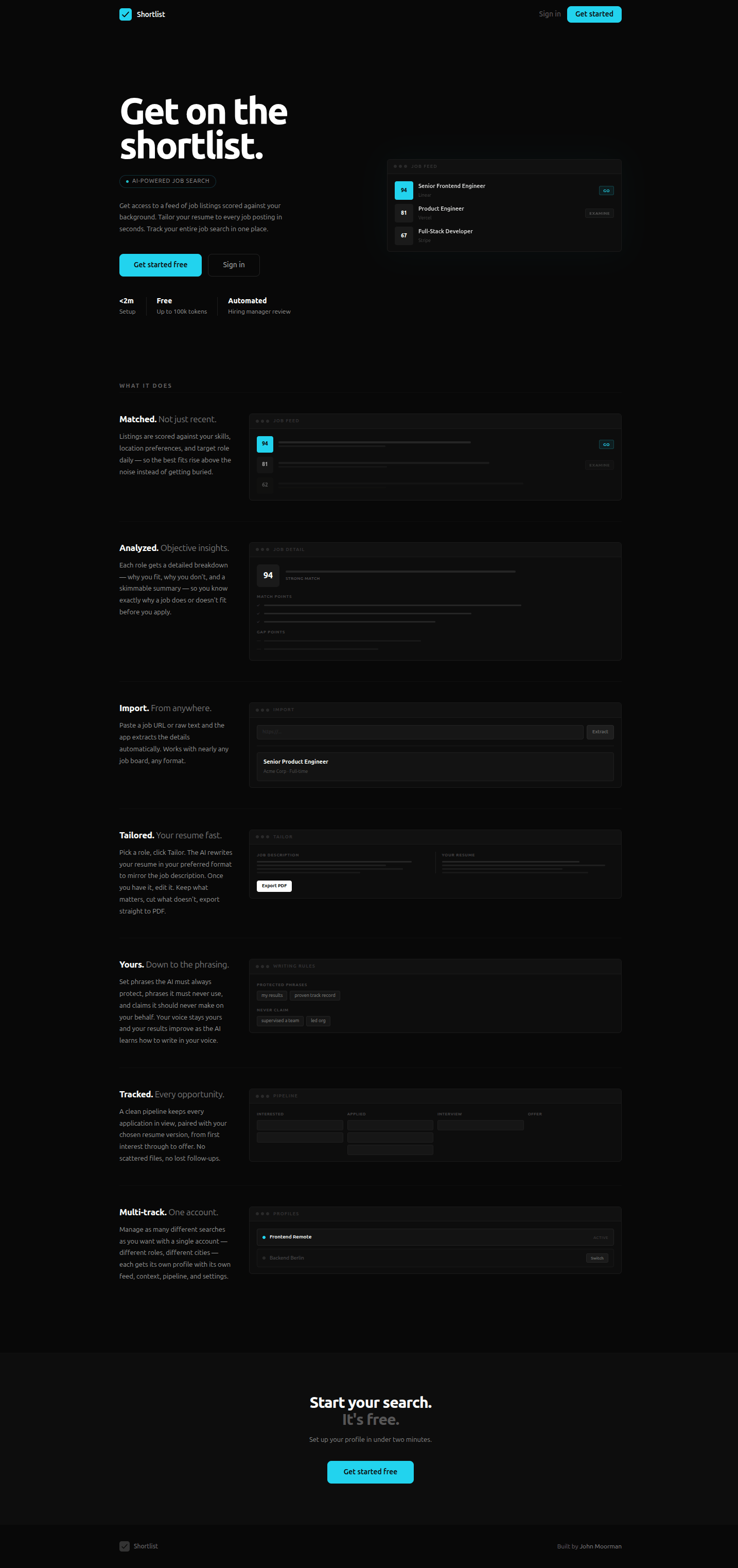
Job Feed. Connect your profile (your skills, experience, what you're looking for) and Shortlist pulls listings from Greenhouse, Lever, and Ashby job boards. The feed deduplicates across sources, so you're never reading the same listing twice from different boards.
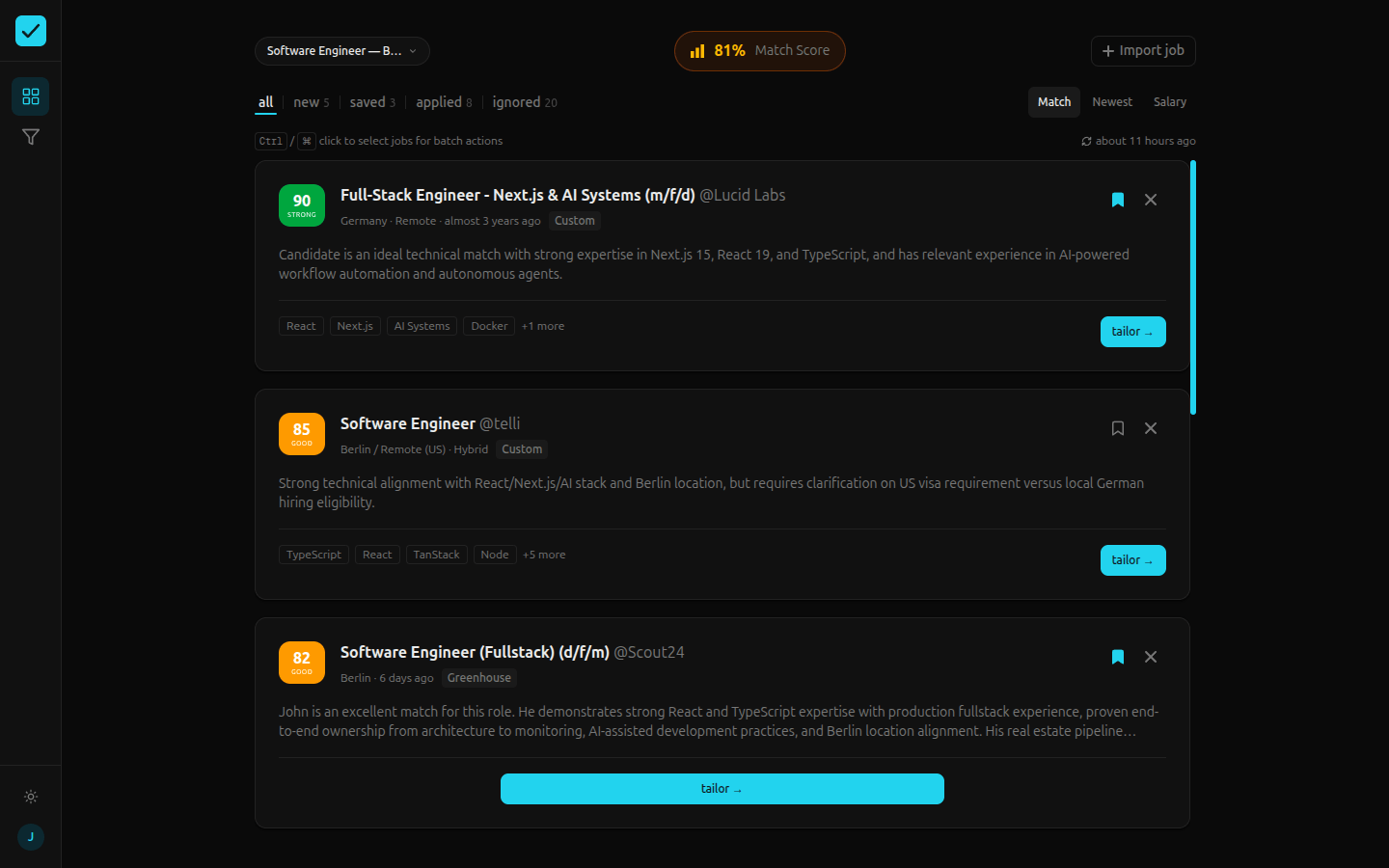
Import. Found a listing on a board Shortlist doesn't scrape yet? Paste the URL or the raw page text and the AI extracts all the structured details automatically. It works with nearly any job board, any format. Once imported, the listing lives in your feed just like any other, ready to be scored and tailored.
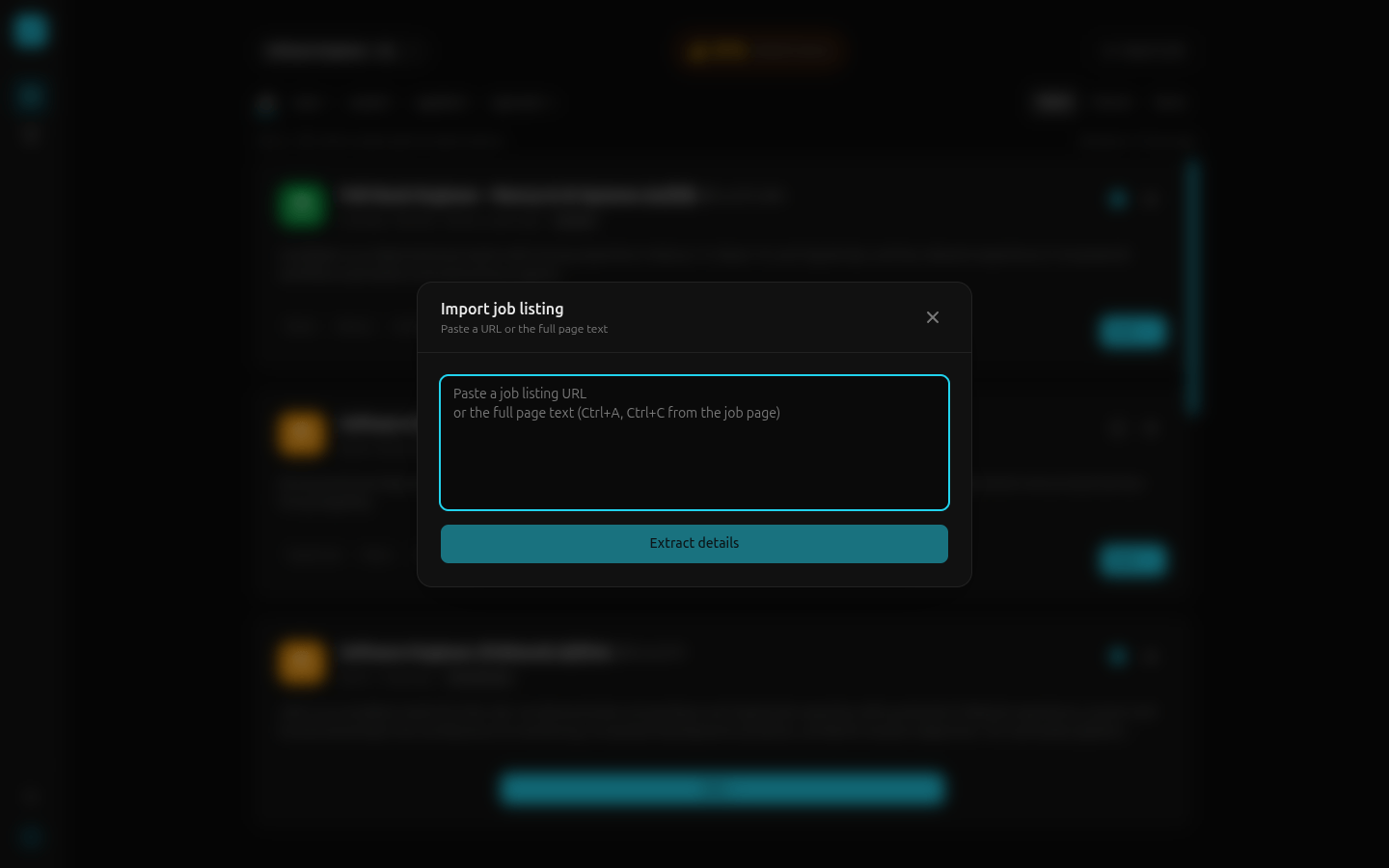
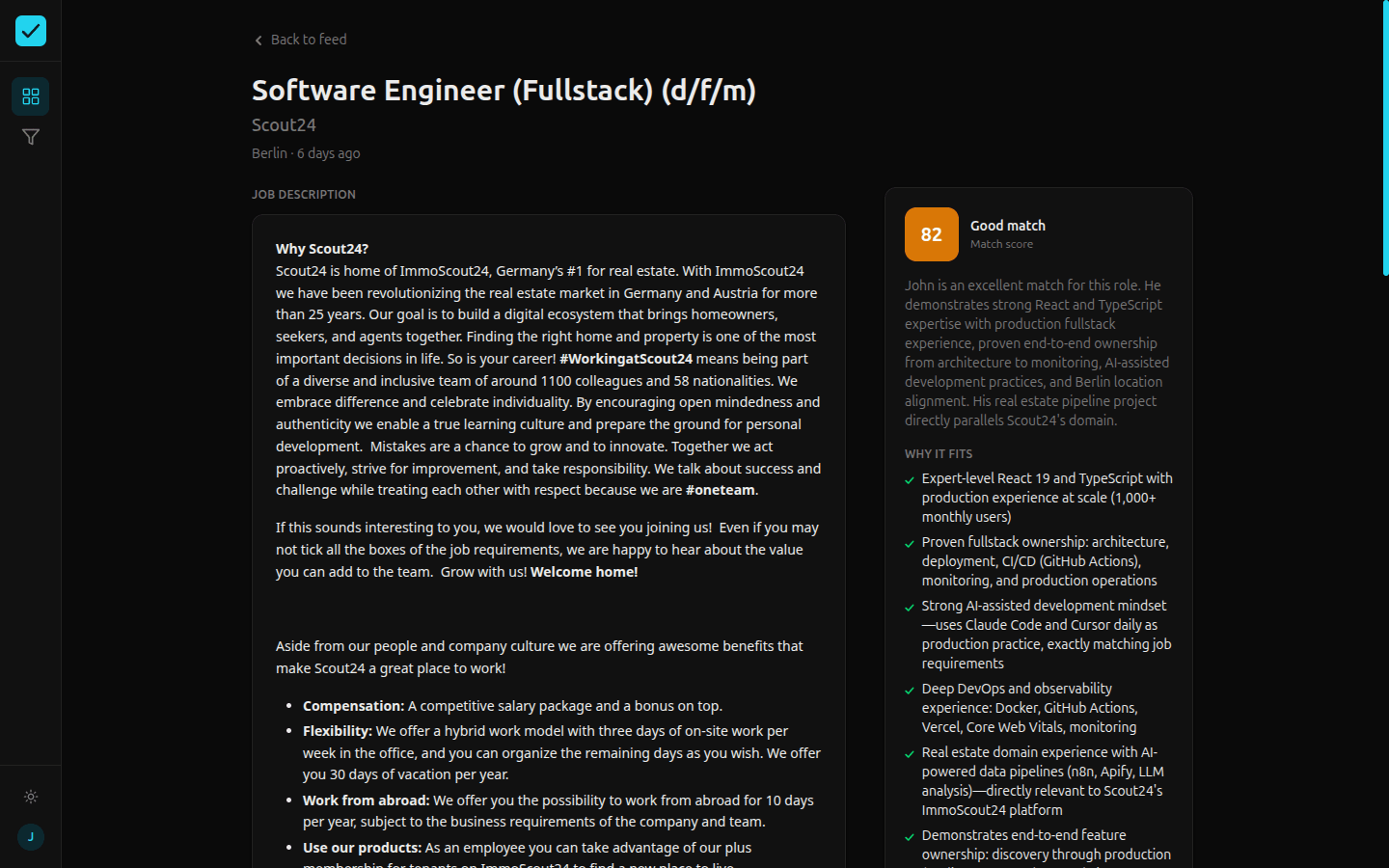
AI Scoring. Every listing gets analyzed against your profile and scored on a 0–100 scale. The model considers role fit, skill alignment, seniority match, location, and a handful of other signals. Low-scoring jobs are hidden automatically, but anything you've manually imported stays visible regardless. If you went out of your way to add it, you probably have a reason.
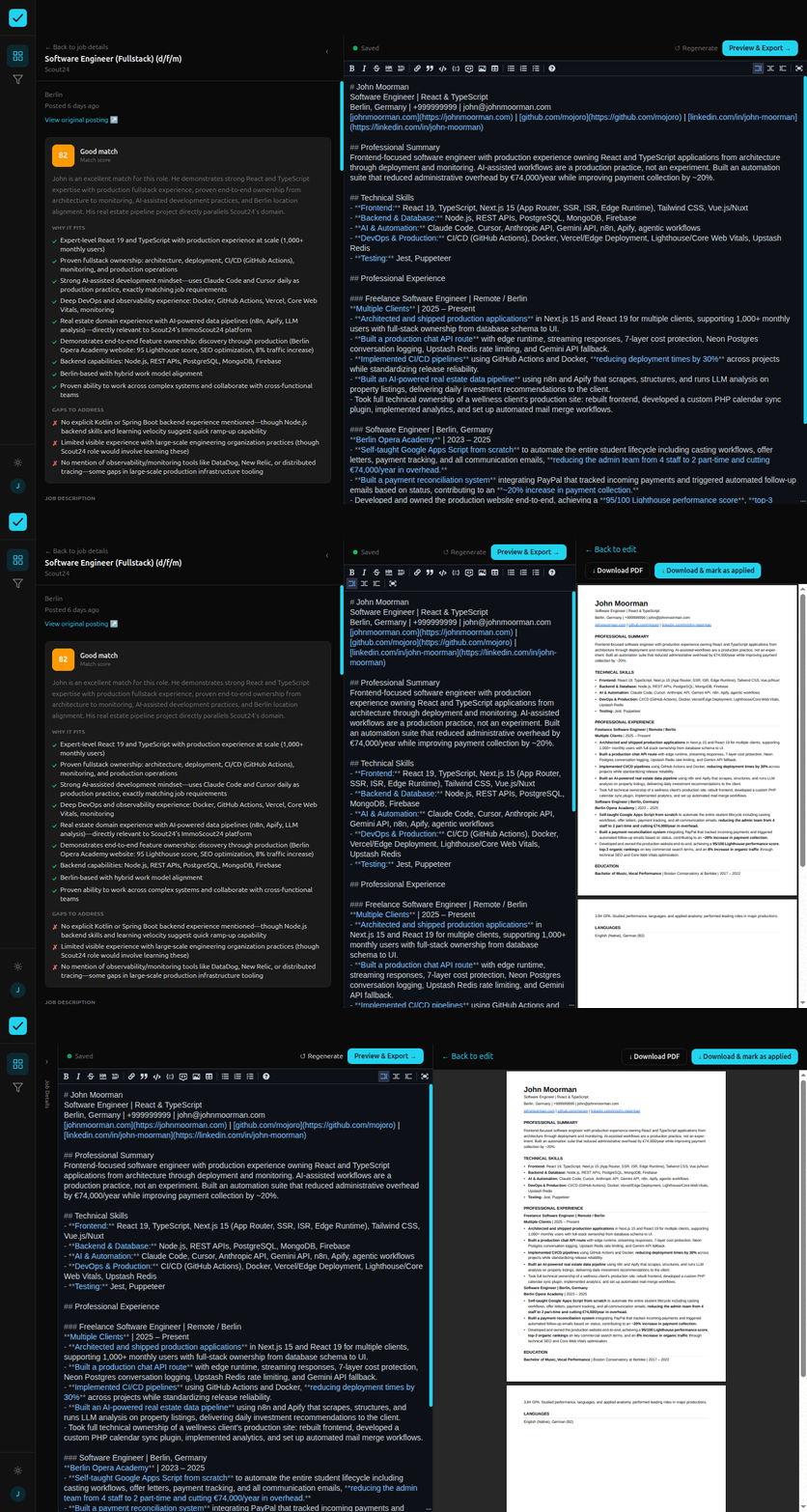
Resume Tailoring. This is the feature I'm most proud of. Pick any job, hit "Tailor," and Shortlist generates a version of your resume rewritten for that specific role. It streams in real time. You watch it write, and you can download it as a PDF when it's done. Critically, the tailoring isn't a free-for-all. You define writing rules: protected phrases that must always appear, banned phrases to avoid, verified metrics it can cite, and claims it must never fabricate. The AI operates within those guardrails. It's your resume, not a hallucinated one.
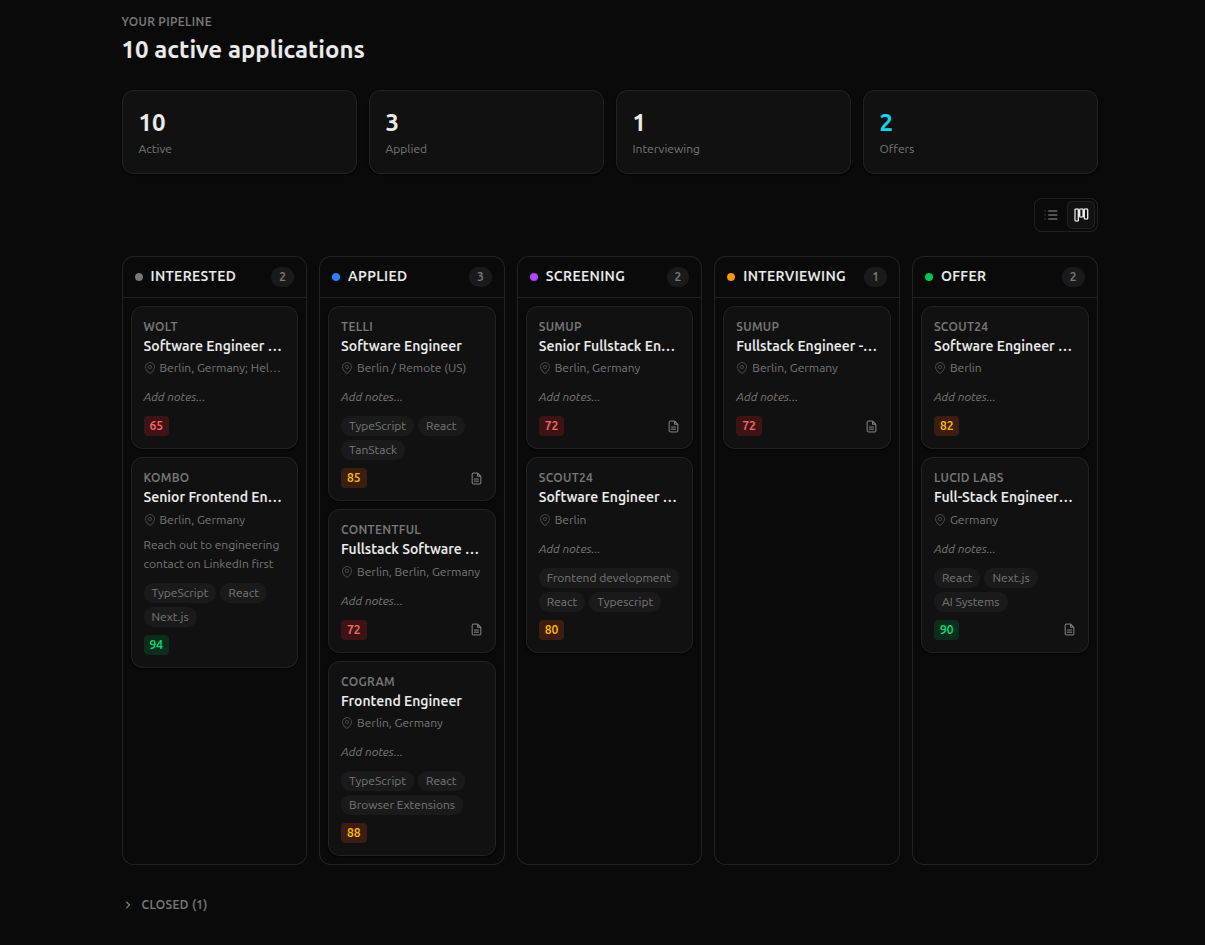
Pipeline Tracker. Once you decide to apply, click confirm. Shortlist will automatically take you to the job's application page and add the listing to the pipeline. Drag jobs through a Kanban board from Interested through Applied, Screening, Interviewing, and Offer. Each card shows the company, role, location, match score, and tags at a glance. Having it live alongside the feed and the tailor means you never have to context-switch to a different app or manage files to access the version of your resume that you sent.
The Surprise: AI as a Mirror
I expected the tailoring feature to be the star. And it is. Watching a thoughtfully rewritten resume stream in, sentence by sentence, tuned to a role I'm actually considering, is genuinely satisfying to use. But the feature that surprised me most was the scoring.
I didn't anticipate how useful it would be to get an objective, dispassionate read on how well a listing actually fits me. When you're deep in a job search, everything starts to look like it could work if you just spin it right. The AI doesn't do that. It looks at the listing, looks at your profile, and gives you a number. Sometimes that number is humbling. Sometimes it's reassuring. Either way, it cuts through the fog of wishful thinking that builds up after weeks of searching.
I found myself trusting it more than I expected. Not blindly. I still read the listings. But as a calibration tool. A way to gut-check whether my excitement about a role was grounded in actual fit or just desperation.
Under the Hood
The stack is Next.js 15 with TypeScript, Prisma ORM over Neon PostgreSQL, Clerk for auth, and Tailwind v4 for styling. AI calls go through OpenRouter to Anthropic's and Qwen's models. The whole thing is about 16,000 lines of TypeScript across 326 commits.
A few architectural decisions that shaped the build:
Pool-first scraping. When Shortlist scrapes a job board, it doesn't immediately associate listings with your profile. Instead, it writes everything into a global pool, a deduplicated reservoir of raw listings. Then a separate matching step creates per-profile job records from that pool. This means if two users are both watching the same company's board, the system scrapes once but matches twice. It also makes deduplication trivial.
Model splitting. The AI does three distinct jobs (scoring, tailoring, and field extraction), and each one has different requirements. Scoring needs to be fast and cheap because it runs in batches across dozens of listings. I use Claude Haiku for that. Tailoring needs to be thoughtful and precise because it's producing something you'll actually send to an employer. That gets Claude Sonnet. Extraction (pulling structured fields out of raw HTML) is Haiku again. Matching model capability to task complexity is one of the most enjoyable parts of working with AI. It's like tuning an instrument, finding the right balance between cost, speed, and quality for each voice in the system.
Writing rules as hard constraints. The tailoring prompt doesn't just say "rewrite this resume for the role." It injects your writing rules as non-negotiable instructions: these phrases must appear, these phrases must not, these metrics are verified (use them), these claims are off-limits (don't fabricate). This is what makes the output trustworthy. Without guardrails, an LLM will cheerfully invent accomplishments for you. With them, it becomes a disciplined writing partner.
Native streaming. Rather than using a higher-level SDK, I stream AI responses directly with ReadableStream and server-sent events. It's more work to set up, but it gives me precise control over the streaming experience. For the tailor, where you're watching your resume appear in real time, that granularity matters.
The last stretch before I called it feature-complete was a security and performance overhaul, followed by a testing suite. These are the kinds of additions that don't show up in the feature list but make the difference between a prototype and something you'd actually put in front of strangers.
Security. The security pass added a full Content-Security-Policy header, HSTS, X-Frame-Options, and a handful of others. The more interesting piece was the rate limiter. Each sensitive endpoint (scoring, tailoring, extraction) now runs through a sliding window check keyed by userId + action. It's in-memory, which means it resets on cold starts, but the monthly token limit in the Usage table is the hard backstop regardless. The rate limiter is just friction. Together they're insurance. I also went through every API route and sanitized error responses. No raw Prisma errors, no stack traces, nothing useful to someone probing the surface.
Performance. Two changes made the biggest difference. The first was removing framer-motion entirely and replacing it with Tailwind CSS transitions. Framer-motion is a 170KB library. For a tool people use every morning, that's a real cost. I'd added it for the landing page demo preview, realized it was overkill, and cut it. The second was moving from repeated database reads to a client-side Zustand store hydrated once at layout mount. Before this, navigating between the feed, a job detail, and the pipeline meant three separate data fetches. After, those transitions are instant. The DB still powers the initial page load and any mutations; the store just caches what's already been fetched and keeps the UI consistent across pages. I also added DB indexes on the foreign keys used in the most common queries, switched the dashboard to Suspense streaming so the shell renders immediately, and set staleTimes in the Next.js config to let the router cache hold onto pages instead of re-fetching on every back navigation.
Testing. I added a Playwright suite covering the five main surfaces: landing page CTAs, the feed with filters and actions, the pipeline table, the job detail with its AI scoring panel and tailor trigger, and cross-page navigation. The setup handles Clerk auth automatically via a global setup file, so tests run against the actual app with a real authenticated session. The tests are smoke tests, not exhaustive coverage. The goal was a safety net for the things that had broken in the past: the PDF rendering policy issue, a Zustand selector bug that caused an infinite render loop in the dashboard. That last one has its own regression test now, which is probably the most valuable thing in the whole suite.
The Build Process
Seven days, roughly 40 hours of focused work. I used Claude Code throughout, following a spec → plan → execute loop: write a specification for each feature, have Claude produce an implementation plan, review and adjust it, then execute. Every spec and plan was committed to the repo, which created a paper trail I could reference when things got complicated.
The speed came from discipline, not shortcuts. Schema design happened before a single component was written. Multi-tenancy was baked in from day one. Each feature was scoped tightly and shipped behind a PR. The AI accelerated the mechanical work (boilerplate, accessibility attributes, debugging), but the architecture, the model choices, the design aesthetic, the prompts: those were all human decisions.
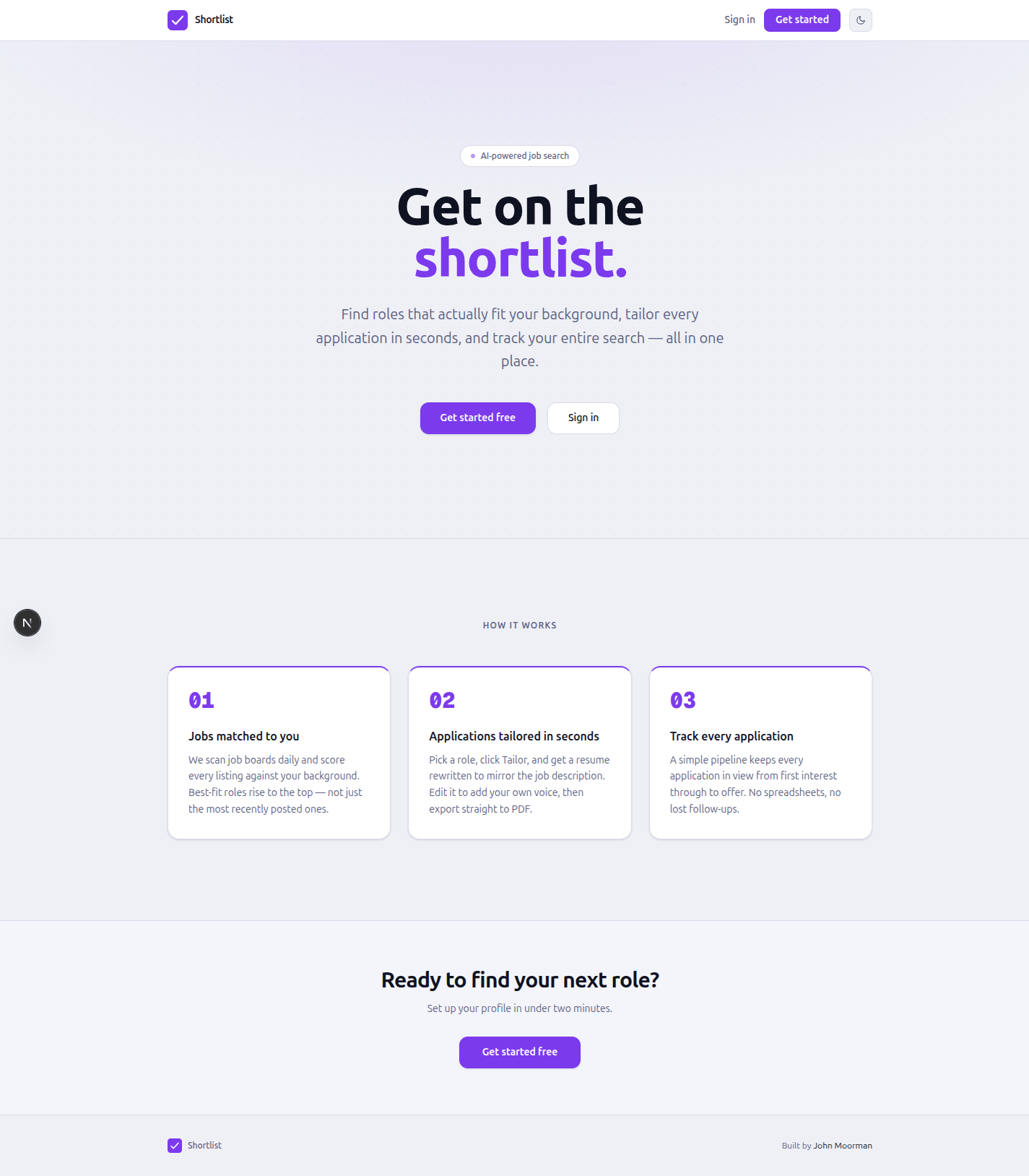
Day six was a full UI overhaul. I'd been heads-down on functionality and the interface had drifted into "functional but forgettable" territory. Ripping it apart and rebuilding around a proper sidebar navigation with a cohesive design system was one of the most productive days of the project. Sometimes the best engineering decision is to stop engineering and start designing.
Why I Haven't Shipped It Yet
Shortlist works. I've been using it for my own job search and it's already changed how I spend my mornings. But I'm reluctant to call it done, because every time I use it I see another edge to smooth, another interaction to improve, another small thing that would make it meaningfully better.
The scraper coverage is limited to three ATS platforms. The onboarding could be gentler. The pipeline board needs bulk actions. There's no notification system yet, so you have to come back and check. These aren't blockers, but they're the difference between a tool that works and a tool that feels good to use every day.
I plan to keep iterating on this when I have time. The foundation is solid and the feature list is long.
What I Hope It Becomes
Job searching is stressful in a way that compounds quietly. It's not any single rejection or any single unanswered application. It's the accumulation, the ambient weight of uncertainty, the feeling that you're spending enormous effort on something with no guaranteed return. I built Shortlist partly because I'm a builder and that's what I do, but also because I genuinely believe that taking the mechanical friction out of the process can make the emotional weight a little more bearable.
If you can open one app, see exactly which new roles fit you, get a tailored resume in thirty seconds, and track everything in one place? That's not just efficiency. That's headspace. That's energy you get back for the parts of the search that actually matter: preparing for interviews, building relationships, staying sharp.
I enjoyed building this more than almost anything I've worked on recently. There's something deeply satisfying about building a robust full-stack application from scratch, end to end, from schema to streaming UI, and having it solve a problem you personally feel. Every layer of the stack was a decision I made and a tradeoff I understood. That kind of ownership is rare and it felt great.
Try It
shortlist.johnmoorman.com · GitHub
Interested?
If Shortlist sounds like something you'd actually use, whether you're job hunting now or just see yourself needing it down the road, I'd genuinely like to hear from you. I'm trying to gauge whether this is a tool worth investing more serious time in. A quick message on LinkedIn or an email to john@johnmoorman.com, or even just a comment below would go a long way in helping me decide where to take it next.