10 in 10, Week 4: Drop OSS
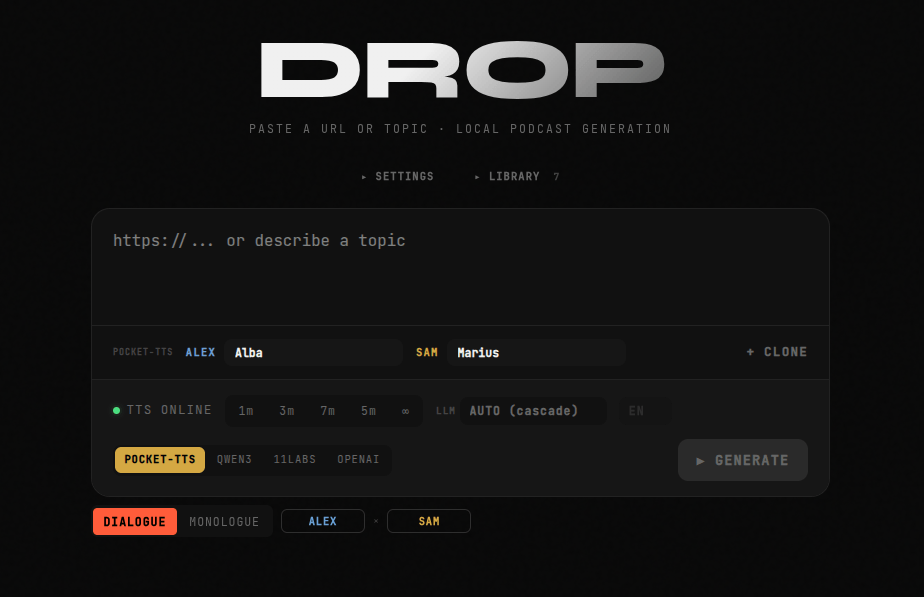
Six days ago, Drop was a two-voice podcast generator that worked beautifully as long as you had active Needle, Featherless, and ElevenLabs credits. Fine for a hackathon demo. Useless the moment those credits ran out or you were processing something you'd rather not upload to a third-party server. This week I rebuilt it as something you can actually own: open-source, self-hostable, and equally functional whether you're hitting an API or running a local model. The previous post covers where it started. This one is about what it took to make it worth running.
The Philosophy Shift
The original Drop worked because three API providers showed up to a hackathon with credits. That's fine for a demo. It's not fine as a foundation for something you'd actually use, because the moment those credits run out — or the moment the service changes its pricing, or you're processing something you'd rather not upload to a third-party server — the whole thing falls apart.
Local-first software has a real cost: you have to run it. There's a Python server to keep alive, a model to download, a GPU that helps. Most people will reach for the API key long before they reach for Docker. But for the people who want to run their own stack, the option should exist, and it should work without friction.
The goal this week was to make both paths equally valid. You can drop an OpenRouter key in .env.local and be generating in sixty seconds, or you can run Ollama (local LLM runtime and model manager) locally and never touch a cloud API. Your API keys, if you use them, are encrypted at rest and never leave your server. The same tool, either way.
The Architecture
Drop is two processes. The Next.js app handles the UI, the API routes, the content scraping, the LLM calls, and the audio stitching. The text-to-speech (TTS) sidecar is a Python FastAPI server running pocket-tts by default, a Kyutai-based local speech model at around 100 million parameters. The two talk over HTTP on a fixed contract: GET /tts/voices, POST /tts/generate, GET /health.
Sidenote: pocket-tts is insanely impressive. The quality it delivers for how lightweight it is, is just mind-blowing.
That separation was a deliberate choice. Python has the ML ecosystem. Node has the web ecosystem. Trying to run a PyTorch model from Next.js is possible but from my understanding unpleasant. Keeping them as separate services means each lives in its own runtime and they can be developed and deployed independently. Docker Compose wires them together for the one-command path; the health check on the TTS container gates the app startup so you never hit the UI before the model is ready.
The pipeline itself is three stages:
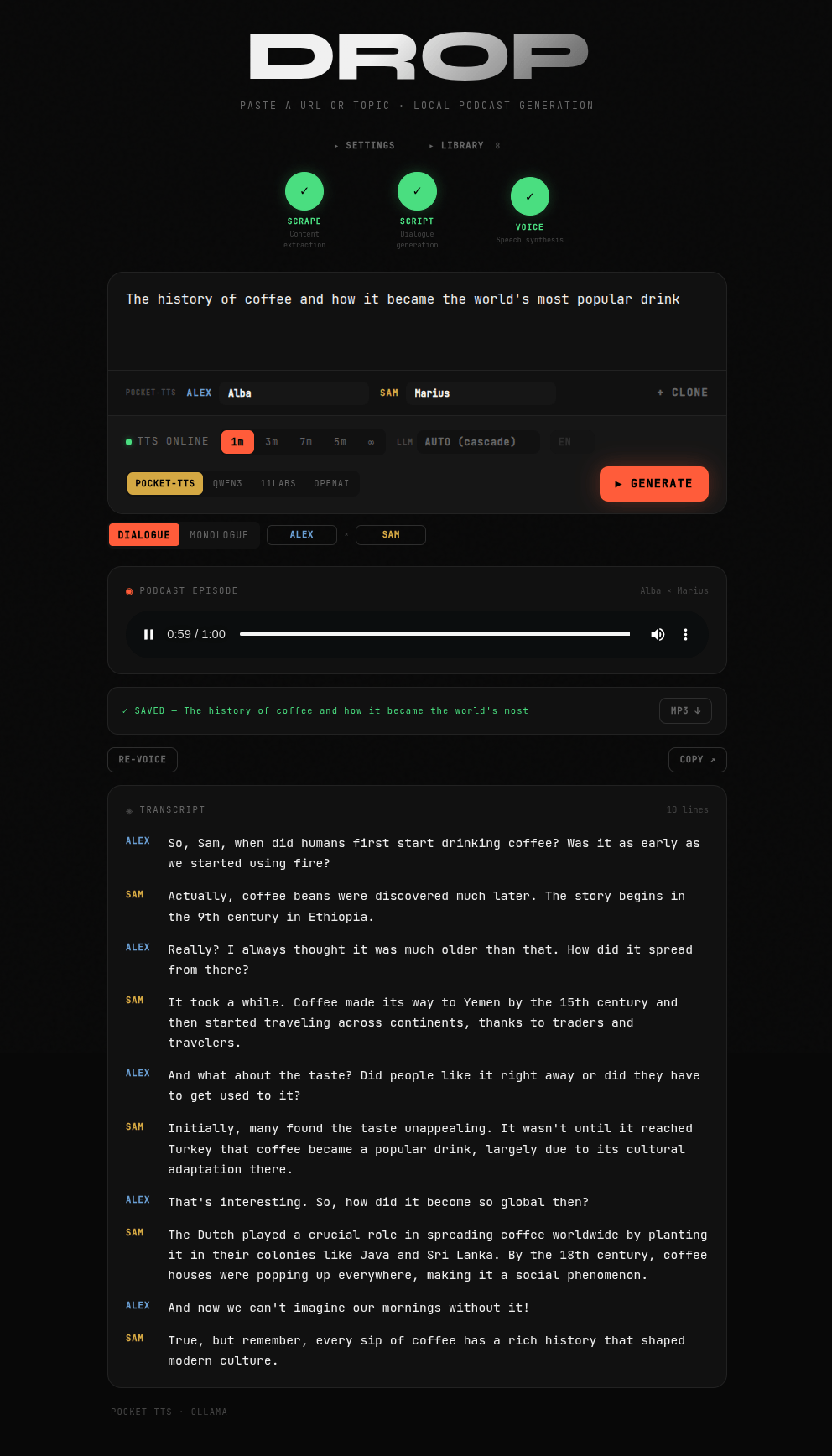
URL or topic → lib/scrape.ts Extract content (Readability + linkedom) → LLM Generate monologue or dialogue script → TTS Synthesize each line, stitch into a single WAV
The whole thing streams. As soon as each stage completes, a server-sent event goes to the browser. You watch the scrape happen, then the script appear, then the UI update as the dialogue is synthesized.
The LLM Cascade
One of the more useful things I built this week is the LLM backend system. Drop supports four script-generation backends: Ollama (local), OpenRouter, Featherless, and Claude Haiku. You can pin to any one of them or run in AUTO mode, which tries them in a configurable order and falls through to the next available backend if one fails or isn't configured.
The cascade solves a practical problem. Not everyone has the same set of API keys or the same local setup. Rather than picking one backend and hoping users have it, Auto mode goes down the list and uses whatever's available. You set the order in the Prompt panel. If you want to try Ollama first but fall back to OpenRouter if the local model isn't running, that's one drag-and-drop.
And if someone doesn't want any of these, the app should be dev-friendly enough that they can plug their own solution in.
What makes this useful in practice is the ⚠ indicator in the LLM selector. If you've manually chosen a backend and the corresponding API key isn't configured, the toolbar tells you immediately rather than letting you hit Generate and find out two minutes later.
What Got Built
The honest answer is: a lot. The hackathon version was, well, hacked together. It was simple. It worked. With only 2.5 hours to build, we took shortcuts. The current version is a properly structured application with extracted components, a library, encrypted settings profiles, multiple TTS backends, and a configuration system. Some of what grew this week:
The generation controls. The original had only one length - about 60-90 seconds of audio. The current version has five: 1 minute, 5 minutes, 10 minutes, 30 minutes, and custom (any duration you want). For long episodes, the script generator uses a sliding-window approach — chaining multiple LLM calls, each continuing from where the last left off — so there's no artificial cap on episode length.
Monologue mode. Toggle between two-host dialogue and single-speaker narration from the UI. The prompt system branches accordingly, and the script parser accepts HOST_B lines as optional rather than required. A small feature that unlocks a meaningfully different use case.
Voice cloning. For the local TTS backend, you can upload a WAV file or record directly from the microphone, and pocket-tts will clone that voice and save it for your future use, nearly instantly. For ElevenLabs and OpenAI, you add a voice ID or name from your account. The voice state persists between server restarts via the voices/ directory mount.
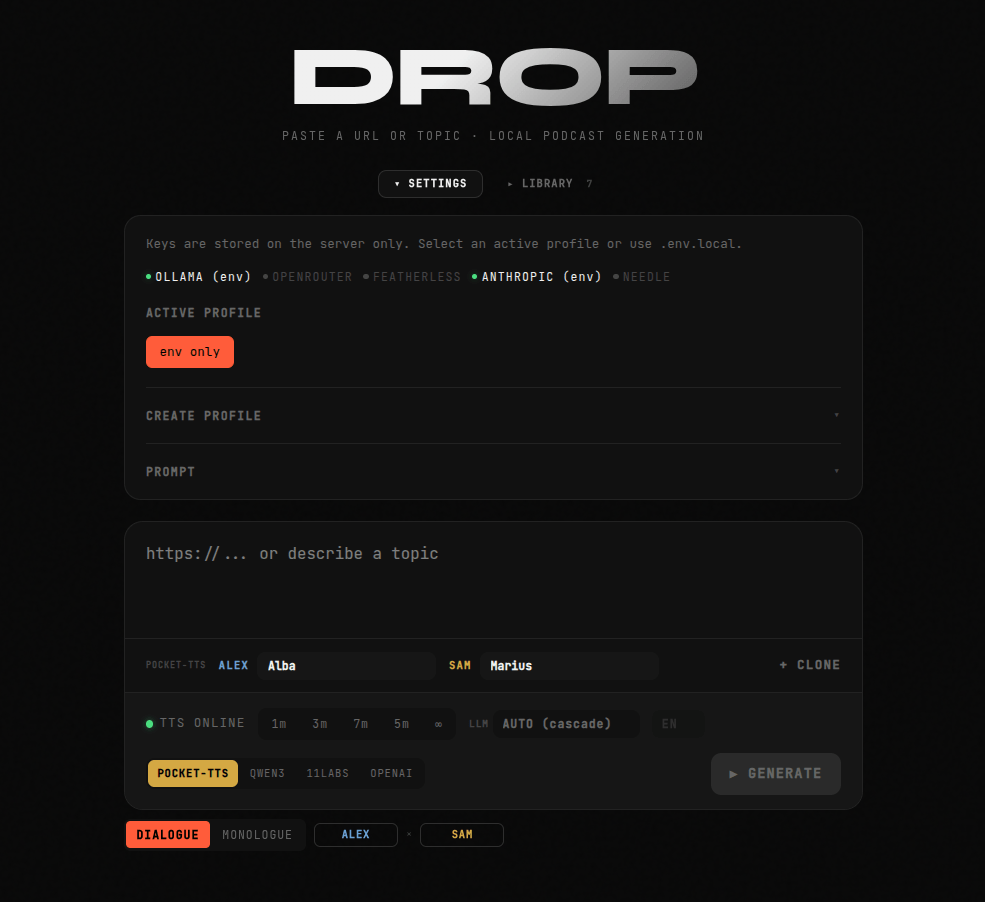
Encrypted settings profiles. Named profiles store API keys and backend configuration on disk, encrypted with AES-256-GCM. For users with multiple api keys, they can create multiple settings profiles. The encryption key is auto-generated on first run and stored at data/.key. It's not perfect, but it is better than storing credentials in plaintext. If plaintext is fine for you, you can also just fill out and rename the .env.example.
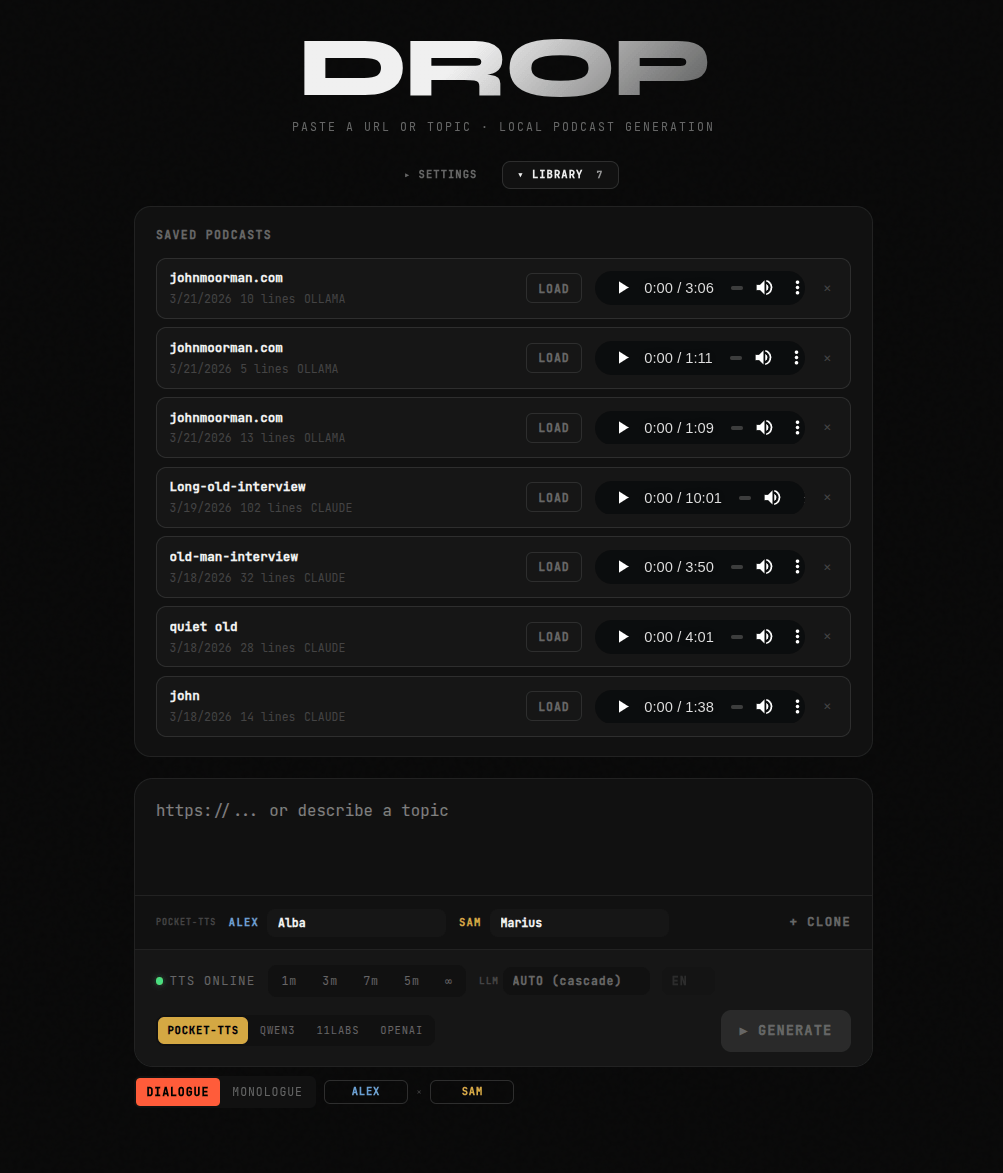
The library. Episodes auto-save after every generation. You can browse saved episodes, load them back (restoring the script, voices, and audio), delete them, or re-voice the script with different voices without regenerating the transcript. The re-voicing option helps a lot with fine-tuning the final result. Sometimes a voice does better with a certain emotional weight or character and the result is different than your expectations. For those of you who can stand the sound of your own voice, you can even make a clone by recording yourself reading the script aloud in the style you'd like it read in, and pocket-tts does a servicable job in taking it the rest of the way.
The Custom Prompt System
The Prompt panel exposes the full system and user prompts, editable in the UI, with template variables: {{HOST_A}}, {{HOST_B}}, {{SOURCE}}, {{LANGUAGE}}, {{LINES_MIN}}, {{LINES_MAX}}, and a few others. You can write a completely different prompt and the pipeline will use it, or at least do its best. I'm curious to see what people come up with here, as it is one of the areas where you can temporarily break the app if your prompt edits result in a weird input to your TTS server. For that reason, one can revert to defaults with one button.
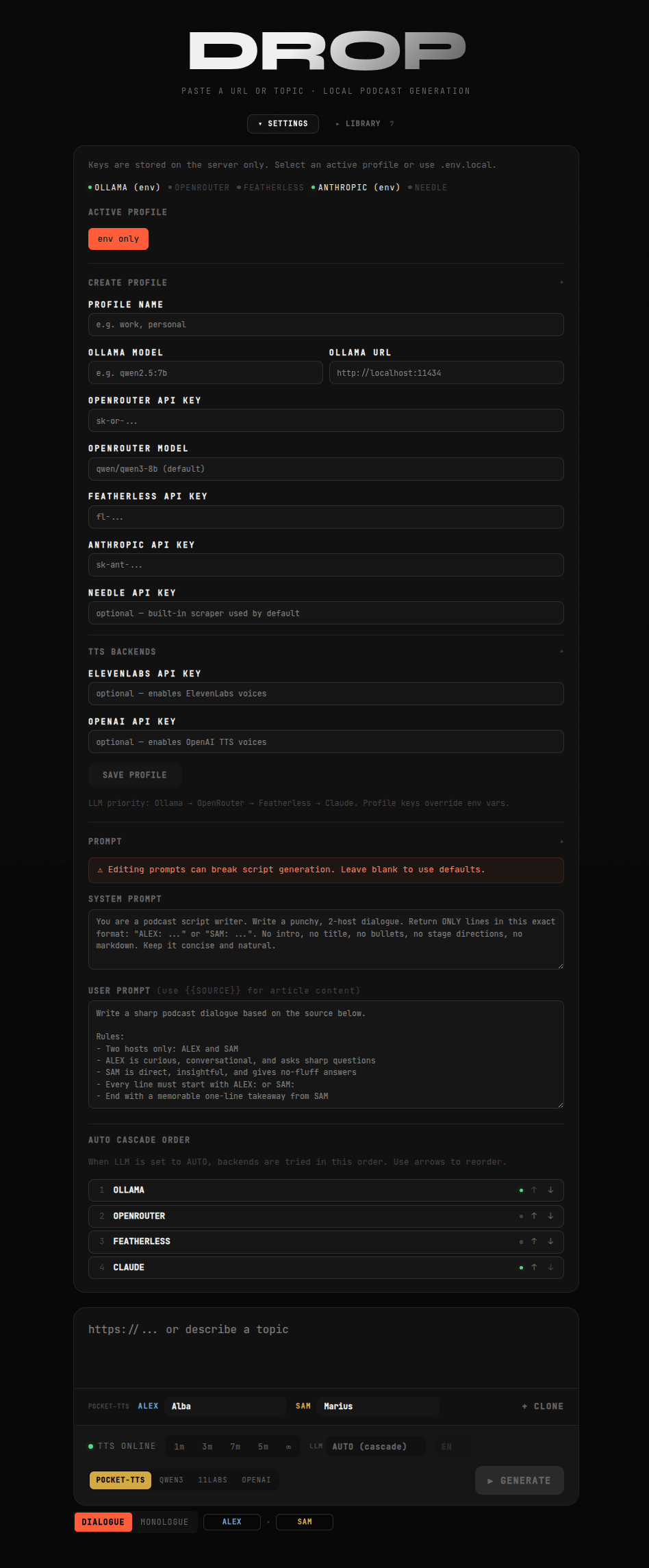
The reason this matters is that the stock prompts are generalist. They work well for turning a news article into a casual conversation. They work less well if you want, say, a Socratic dialogue, or a formal lecture, or something in a specific tone or format. Rather than trying to anticipate every use case in the default prompts, I exposed the controls and let users configure their own.
The LLM cascade order is also configurable from the same panel. Use the arrow buttons to reorder. The order you set persists as part of the profile.
A Note on the Qwen3-TTS Integration
At the end of the week I added a second local TTS option alongside pocket-tts: Qwen3-TTS, a recent model from Alibaba with nine named speakers and ten language options. It lives in qwen-tts-server/ as a separate sidecar with the same API contract as the pocket-tts server, and it slots into the TTS router as a fourth backend: POCKET-TTS / QWEN3 / 11LABS / OPENAI.
Theoretically it should work, but I don't have the hardware to run it. My GPU isn't powerful enough, so the integration was built against the published API documentation and model specifications without being run end-to-end. The code is theoretically correct. The API contract matches. But I can't promise it works out of the box.
"So why build it?" I hear you saying. Because the people demand it! I say. And because I really wanted to try this out with qwen-tts because of all the hype I hear around it, and I was disappointed to be met with so many out of memory errors trying to get it running on my machine which could theoretically handle it.
So, it is my hope that if you have a capable NVIDIA GPU and the Container Toolkit installed, you can contribute by testing it out for me! docker compose --profile qwen up is the path. The model downloads on first run (several GB). I would very much like to hear whether it works.
New for Me
I had not worked with audio programatically before this project, so it was fun to learn about some of the idiosyncracies involved. Every TTS backend outputs audio with different characteristics. pocket-tts returns 24kHz mono float32. ElevenLabs returns MP3, which has to go through ffmpeg to become WAV, resampled to 24kHz for consistency. The stitching layer has to normalize before it can concatenate, and the normalization has to be right or you get audio that plays back at the wrong pitch, has gaps in the wrong places, or clicks at the seams. The kind of bug that's immediately obvious to a listener and completely invisible in the code until you understand what's happening at the sample level.
Working through it was a good reminder that shipping into an unfamiliar domain usually means one layer of abstraction that looks simple (stitch the audio files together) concealing another layer that isn't (make sure they're actually compatible before you try). I'm glad the project pushed me into it. During the hackathon my teammate Bernhard owned this feature and handed it to me bug-free. Shoutout to him for the great work! Building it myself this time around was a different kind of satisfying.
On Shipping This Week
The week started with a plan to "clean up the hackathon code and make it self-hostable." That's not exactly what happened. The scope expanded significantly, which is usually a bad sign. In this case I think it was the right call, as each change felt meaningful. A minimal self-hostable version without the settings profiles, the library, the custom prompts, and the cascade system would have been a much less interesting piece of software. Previous projects I have tried to cater to getting everyone on board, but for this project I am catering to the power user who likes to dig into the details and configure everything.
I'm aware that a project like this is never done. There are things I want to add: a web search mode for generating episodes from real-time sources rather than just URLs (some kind of research support for the topics you put in), multiple link support, so it synthesizes multiple sources for its script, better voice preview before generation, a streaming mode where the audio starts playing before synthesis is complete, group discussion format, queuing up the generation of multiple topics. These are for later. Maybe.
The thing that exists now works well. I think everyone that uses it will have a different use case. Some might like it to summarize articles, or a newsletter, or have it give an interview about themselves. For me, I had the most fun coming up with interesting topics and making multiple clones of my voice in different characters, like an interview with a centenarian from the late 1800s.
Once it was built, my wife joined and we had our voice clones act out a ridiculous scene with the ridiculous voices we recorded and couldn't help but laugh at the result.
Try It
The repo is at github.com/mojoro/drop. Set up should be as simple as cloning, then cp .env.example .env.local, add one API key, docker compose up. The README covers everything else.
If you run into something broken, open an issue. If the Qwen3-TTS backend actually works on your machine, I especially want to hear about it.
This is week 4 of a 10 projects in 10 weeks challenge. Week 3 was Shortlist. Week 5 coming soon.